ShopDreamUp AI ArtDreamUp
Deviation Actions


Suggested Deviants


Suggested Collections


You Might Like…



Description
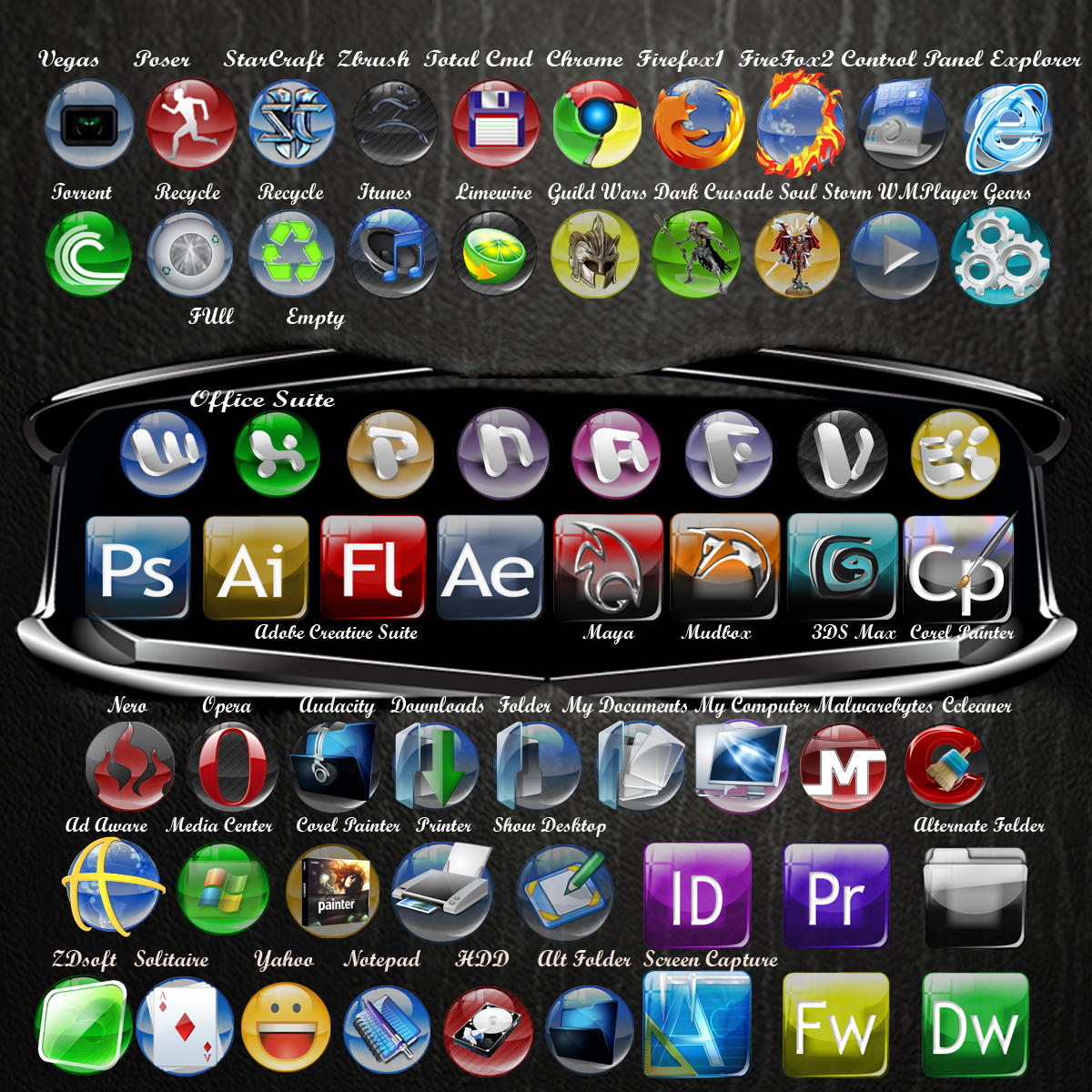
Description: I built the glass orb myself in Illustrator, It's my fifth attempt at the same web button, and each time it looks more shiny and more realistic.
In the last attempt I figured out how to do transparency masks, which for Illustrator is convoluted and messy and still doesn't look as good as Photoshop's. I built these icons in PS using the glass web button I created in AI.
It's somewhat hard to tell from the preview, but these icons are somewhat translucent and look best on an object dock
Edit: 5/10/10
The set is pretty small atm, if there are icons you'd like to see added to this style, add a comment.
Edit:5/10/10
Added suggestions from the first comment, I might be doing a full adobe suite to match this set, but atm I'm using square icons that match...
Edit:5/11/10
Improved quite a few already made, made an alternative Firefox icon and added carbon fiber effect to many blue and black icons. Also added many more, set now has 36 icons.
Edit: 11/27/10
Finally finished the Adobe Suite set and added a set of like Autodesk Suite icons. I've added a few more of the normal spherical icons over time as I've needed them personally.
The square button was made by pulling the sphere into a square shape layer by layer, and then by going back through and adding a curve to the sides of all the layers. I also changed the button so that it was darker on the bottom. Set now contains 51 icons.
Edit 1/26/11
Set now has 62 icons
Edit: 4/15/2011
Updated Icon set can be found here [link]
Browser Icons for this theme can be found here [link]
A preview of all icons in the most current set can be seen here [link]
In the last attempt I figured out how to do transparency masks, which for Illustrator is convoluted and messy and still doesn't look as good as Photoshop's. I built these icons in PS using the glass web button I created in AI.
It's somewhat hard to tell from the preview, but these icons are somewhat translucent and look best on an object dock
Edit: 5/10/10
The set is pretty small atm, if there are icons you'd like to see added to this style, add a comment.
Edit:5/10/10
Added suggestions from the first comment, I might be doing a full adobe suite to match this set, but atm I'm using square icons that match...
Edit:5/11/10
Improved quite a few already made, made an alternative Firefox icon and added carbon fiber effect to many blue and black icons. Also added many more, set now has 36 icons.
Edit: 11/27/10
Finally finished the Adobe Suite set and added a set of like Autodesk Suite icons. I've added a few more of the normal spherical icons over time as I've needed them personally.
The square button was made by pulling the sphere into a square shape layer by layer, and then by going back through and adding a curve to the sides of all the layers. I also changed the button so that it was darker on the bottom. Set now contains 51 icons.
Edit 1/26/11
Set now has 62 icons
Edit: 4/15/2011
Updated Icon set can be found here [link]
Browser Icons for this theme can be found here [link]
A preview of all icons in the most current set can be seen here [link]
© 2010 - 2024 quicksilver20
Comments3
Join the community to add your comment. Already a deviant? Log In
It are very nice !!!